Waves COSMOS Sample Finder: Sample Finder Plugin
Quick—what sound is the sample with filename asdf_#12C.wav? You may not know
but COSMOS does. COSMOS uses an AI neural networks engine to analyze all the samples on your hard drive
and then categorizes and auto-tags the instrument
timbre
style
key
BPM
and sonic characteristics (loop or one-shot
dry or wet
and much more) in its database.
Need to find a saturated kick? Just type “saturated” and “kick” in COSMOS
and all your saturated kicks will show up
no matter what the files are actually named. Need to find a bright reverby drum loop in 120 BPM? Or a saturated synth sample in F#-minor with a cinematic feel? Just choose the appropriate tags
and COSMOS will deliver the samples you’re after
instantly.
Multiple Search Options
Search by Instrument Tags Key and/or BPM. Or enter a search term. Start a broad search like “keys ” then narrow it down to the keyboard type and finally choose from multiple sonic characteristics.View by Waveform or List
When you need to see a waveform with a short description choose Waveform view. Or choose List for more details about a given sample. In either case just click to audition and then drag a sample into your sampler.Explore the COSMOS
The COSMOS view creates “clusters” of related one-shots like kick snare plucked notes and so on. Prioritize views of different characters then click on dots in the clusters to audition—and find—the right sample in seconds.Seamless Integration with the Waves CR8 Sampler
COSMOS works with any sampler but integrates especially seamlessly with the Waves CR8 Creative Sampler. COSMOS opens conveniently from within the sampler. Found a sample you like? Double-click and it will load instantly in a CR8 sample slot.Features:
- Uses AI to sort and auto-tag all the samples on your hard drive
- Sorts by instrument key BPM and more sonic characteristics
- Saves you time by finding the samples you want
- Assign oft-used samples to a favorites list or create collections
- Use as a standalone app or open from the Waves CR8 sampler
- Over 2500 royalty-free samples included
- 3 views: waveform list and COSMOS “cluster” view
- Re-discover samples you forgot you had
- Compatible with all WAV AIF OGG and FLAC files
- Powered by Waves Neural Networks technology
Requirements:
| Platform | CPU | RAM | Disk | Notes | Additional Requirement | Audio Card | Ports | Internet Required | 32 Bit Support | 64 Bit Support | Plugins |
| mac | 8 | 16 | 0 | 0 | 0 | VST-2 VST-3 AU AAX | |||||
| windows | 8 | 16 | 0 | 0 | 0 | VST-2 VST-3 AAX |
$997.50
Original: $3,325.00
-70%Waves COSMOS Sample Finder: Sample Finder Plugin—
$3,325.00
$997.50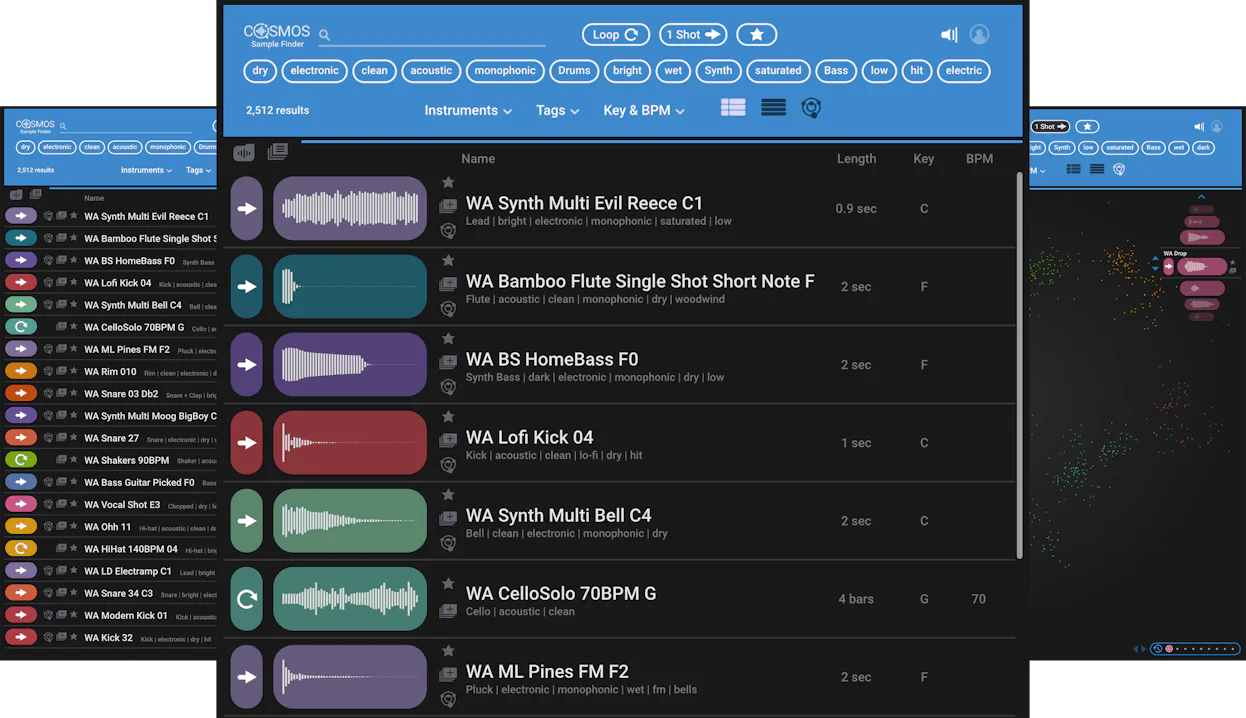


Description
Quick—what sound is the sample with filename asdf_#12C.wav? You may not know
but COSMOS does. COSMOS uses an AI neural networks engine to analyze all the samples on your hard drive
and then categorizes and auto-tags the instrument
timbre
style
key
BPM
and sonic characteristics (loop or one-shot
dry or wet
and much more) in its database.
Need to find a saturated kick? Just type “saturated” and “kick” in COSMOS
and all your saturated kicks will show up
no matter what the files are actually named. Need to find a bright reverby drum loop in 120 BPM? Or a saturated synth sample in F#-minor with a cinematic feel? Just choose the appropriate tags
and COSMOS will deliver the samples you’re after
instantly.
Multiple Search Options
Search by Instrument Tags Key and/or BPM. Or enter a search term. Start a broad search like “keys ” then narrow it down to the keyboard type and finally choose from multiple sonic characteristics.View by Waveform or List
When you need to see a waveform with a short description choose Waveform view. Or choose List for more details about a given sample. In either case just click to audition and then drag a sample into your sampler.Explore the COSMOS
The COSMOS view creates “clusters” of related one-shots like kick snare plucked notes and so on. Prioritize views of different characters then click on dots in the clusters to audition—and find—the right sample in seconds.Seamless Integration with the Waves CR8 Sampler
COSMOS works with any sampler but integrates especially seamlessly with the Waves CR8 Creative Sampler. COSMOS opens conveniently from within the sampler. Found a sample you like? Double-click and it will load instantly in a CR8 sample slot.Features:
- Uses AI to sort and auto-tag all the samples on your hard drive
- Sorts by instrument key BPM and more sonic characteristics
- Saves you time by finding the samples you want
- Assign oft-used samples to a favorites list or create collections
- Use as a standalone app or open from the Waves CR8 sampler
- Over 2500 royalty-free samples included
- 3 views: waveform list and COSMOS “cluster” view
- Re-discover samples you forgot you had
- Compatible with all WAV AIF OGG and FLAC files
- Powered by Waves Neural Networks technology
Requirements:
| Platform | CPU | RAM | Disk | Notes | Additional Requirement | Audio Card | Ports | Internet Required | 32 Bit Support | 64 Bit Support | Plugins |
| mac | 8 | 16 | 0 | 0 | 0 | VST-2 VST-3 AU AAX | |||||
| windows | 8 | 16 | 0 | 0 | 0 | VST-2 VST-3 AAX |